Comparative Value of Currency in DnD
| Currency | Relative to Gold | Relative to Dollar |
| Copper Coin | 1:100 | $1.00 |
| Silver Coin | 1:10 | $10.00 |
| Gold Coin | 1:1 | $100.00 |
| Platinum Coin | 10:1 | $1000.00 |
Weight
10 Coins to a Pound
Available Wealth by Population
| Population | Settlement Type | Wealth Range | GP Limit | Trade Bonus |
| 20-80 | Trading Post | 40-160 GP | 15 GP | 0 |
| 80-400 | Hamlet | 160-800 GP | 75 GP | 0 |
| 400-900 | Village | 800-1800 GP | 100 GP | 0 |
| 900-2000 | Small Town | 1800-4000 GP | 250 GP | 0 |
| 2000-5000 | Large Town | 4000-10000 GP | 1000 GP | 0 |
| 5000-12000 | Small City | 10000-24000 GP | 2000 GP | 0 |
| 12000-25000 | City | 24000-50000 GP | 4600 GP | 2 |
| 25000-50000 | Large City | 50000-100000 GP | 5000 GP | 4 |
| 50000-150000 | Metropolis | 100000-300000 GP | 20000 GP | 6 |
- GP Limit indicates the most expensive item this settlement can sell.
Speculative Trading (Under Construction)
- Adapting from Traveller Trade System

Multiple Suppliers or Buyers
If either when buying or selling, you wish to find an alternate supplier, you can start the process from scratch. Add a -1 to your second Find Supplier or Buyer roll or -2 to your third Find Supplier or Buyer roll. Essentially, you add a 1 for each attempt after your first attempt.
Open Market
1. Find a supplier
The Settlement Type (ST) size provides a bonus:
Metropolis: DM+6
Large City: DM+4
City: DM+2
• Finding a Supplier: (8+) 2D6 + CHA MOD + INT or WIS MOD + ST bonus. It takes 1d days to to find this supplier.
2. Determine goods available
• All Common Goods
• Trade Goods that match the Cities Trade Codes
• Quantity of randomly determined goods equal to the Population City.
Roll on the Trade Goods table to randomly determine the goods available, re-rolling results 61–65 unless dealing with a black-market supplier. If you roll the same type of goods multiple times, then the supplier has extra amounts of those goods available.
3. Determine purchase price
To determine the purchase price, roll 3D and apply the following modifiers:
3D + CHA MOD + Purchase DM Column – Sale DM column – Supplier’s CHA MOD mod (default 2) = Effect
In cases where multiple Purchase or Sale DMs apply, use only the largest from each column.
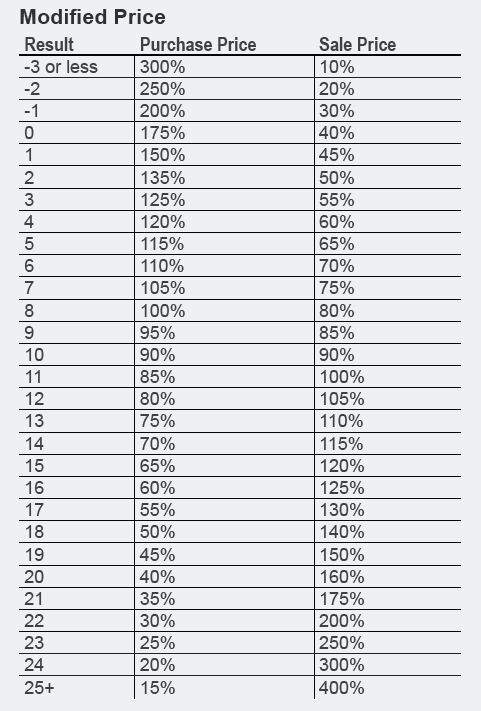
Next, use the result of the 3D roll plus Effect and consult the Purchase Price column of the Modified Price table.
The trader does not have to accept this price but if they reject the deal, they cannot deal with that supplier again for at least a month.
4. Purchase goods and travel to another market
5. Find a buyer
The Settlement Type (ST) size provides a bonus:
Metropolis: DM+6
Large City: DM+4
City: DM+2
- Finding a Supplier: (8+) 2D6 + CHA MOD + INT or WIS MOD + ST bonus. It takes 1d days to to find this supplier.
6. Determine sale price
To determine the sale price, roll 3D and apply the following modifiers:
3D + CHA MOD + Purchase DM Column – Sale DM column – CHA MOD mod (default 2) = Effect
In cases where multiple Purchase or Sale DMs apply, use only the largest from each column.
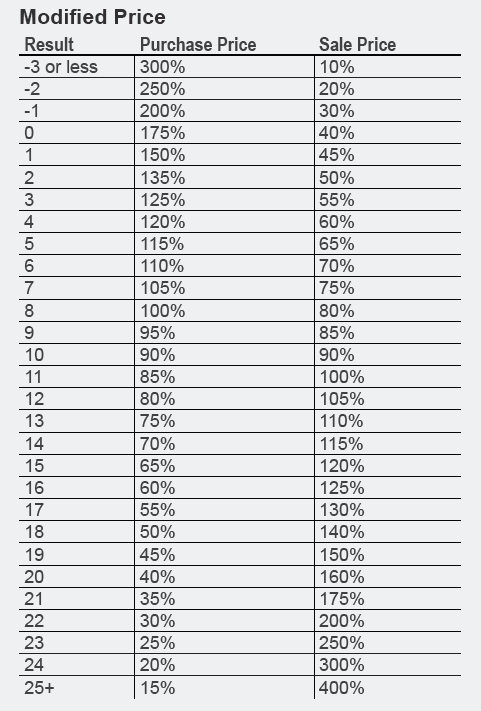
Next, use the result of the 3D roll plus Effect and consult the Sale Price column of the Modified Price table.
The trader does not have to accept this price but if they reject the deal, they cannot deal with that supplier again for at least a month.
7. Choose to sell or not to sell
You can choose not to sell to this buyer. You may try to find another buyer using the method outlined in the Multiple Suppliers or Buyers section.
 Sealab